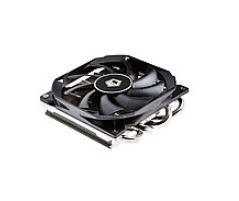
🌬️ Upgrade your CPU cooling with the **Intel CPU Cooler IS-30** from ID Cooling. Compact, efficient, and ultra-quiet, it's compatible with a wide range of Intel and AMD processors, ensuring stable and smooth performance. ✨ Don't wait – call now at 037281198 to purchase and get expert advice!
🔥 Upgrade your computing experience with the **Intel CPU Cooler IS-30** from ID Cooling! This powerful and efficient cooler will keep your processor at optimal temperatures, ensuring a smooth and stable experience even under heavy loads. Don't wait for overheating – boost your PC's performance today! For more details and professional advice, don't hesitate to call us at 037281198.
Designed for a wide range of Intel and AMD processors, this cooler provides a reliable and compact cooling solution even for systems with limited space, without compromising on cooling power.
⚡ Product Benefits: Optimal CPU Cooling
Excellent Cooling Performance: With a 100W TDP, the IS-30 cooler provides optimal cooling for powerful processors, preventing overheating and maintaining stable performance over time. Say goodbye to slowdowns and crashes!
Wide Compatibility for Intel and AMD Processors: Supports a wide range of Intel sockets (LGA1200/1150/1151/1155/1156) and AMD sockets (AM4/FM2+/FM2/FM1/AM3+/AM3/AM2+/AM2), making it a versatile choice for a variety of existing and new systems.
Compact and Space-Saving Design: A 92mm low-profile fan, ideal for small cases or systems with space limitations, without compromising on cooling power. Perfect for building miniature PCs!
Ultra-Quiet Operation: Engineered for the quietest possible operation, for a more pleasant user experience, even under high load. Enjoy a quiet and peaceful work or gaming environment.
Easy and Simple Installation: Comes with a clear and simple installation kit, allowing quick and convenient assembly even for less experienced users. New cooling in minutes!
⚙️ Technical Specifications: ID Cooling IS-30 CPU Cooler
Warranty: One year warranty at company labs under reasonable use
Product Type: New product
👥 Who Is This For: ID Cooling IS-30 CPU Cooler
The ID Cooling IS-30 is an excellent cooling solution for:
Home Users: Who want to improve PC performance, extend CPU life, and maintain system stability over time.
Gamers: For compact gaming systems that require efficient cooling without taking up much space, allowing for long gaming sessions without worries.
PC Builders: Looking for a reliable, efficient, and cost-effective cooling solution for a wide range of processors, with simple installation.
Offices and Small Businesses: For computers that work long hours and require reliable cooling to maintain consistent productivity and performance.
🧩 Usage and Installation Guide: Tips for Optimal CPU Cooling
Installing a CPU cooler requires some technical knowledge. It is recommended to consult the detailed guide included with the product. Here are some general tips to help you:
Preparation: Make sure the computer is turned off and completely disconnected from power. Carefully remove the old fan.
Thorough Cleaning: Clean any old thermal paste residue from the CPU and the new cooler's surface using a special cleaning agent (e.g., isopropyl alcohol). Thorough cleaning ensures optimal contact.
Applying New Thermal Paste: Apply a small amount of new, high-quality thermal paste (about the size of a small pea) to the center of the CPU. There is no need to apply too thick a layer.
Positioning the Cooler: Gently place the cooler on the CPU, ensuring it is straight and aligned.
Secure Fastening: Attach the cooler's bracket to the motherboard and tighten the screws gradually and diagonally to ensure even pressure and full contact.
Connecting Cables: Connect the fan cable to the appropriate socket on the motherboard (usually marked as CPU_FAN).
Initial Check: Turn on the computer and ensure the fan is spinning and there are no error messages. It is recommended to check CPU temperatures using appropriate software.
For a more detailed installation guide, please visit our Installation Guide.
📸 Product Image Gallery / Illustration
Image for illustration purposes only. Minor design changes may occur.
❓ Frequently Asked Questions (FAQ) about the ID Cooling IS-30 Fan
Will the ID Cooling IS-30 fan fit my processor?
The ID Cooling IS-30 fan is compatible with a wide range of popular sockets: Intel LGA1200, LGA1150, LGA1151, LGA1155, LGA1156, as well as AMD AM4, FM2+, FM2, FM1, AM3+, AM3, AM2+, AM2. To ensure full compatibility, we recommend checking your processor model and motherboard socket. If you are unsure, our expert team at Braumers will be happy to assist you by phone at 037281198.
What is the main difference between a 92mm and 120mm fan, and why choose the IS-30?
The main difference is in fan size and the amount of air it can move. A 92mm fan, like the IS-30, is more compact and especially suitable for small cases or systems with space limitations, while maintaining highly efficient cooling with a TDP of 100W. A 120mm fan is larger, usually quieter, and capable of higher cooling efficiency, but requires more space in the case. If you are looking for a compact, efficient, and quiet solution, the IS-30 is the perfect choice.
Do I need to use new thermal paste when installing the fan?
Yes, absolutely! Every time you replace or remove a CPU cooler, it is essential to thoroughly clean the CPU and the cooler's contact surface of old thermal paste, and apply a new, thin layer of high-quality thermal paste. Thermal paste is critical for efficient heat transfer from the CPU to the cooler, and replacing it ensures the best cooling performance and CPU longevity.
Don't wait for your processor to overheat and impact performance! Purchase the **Intel CPU Cooler IS-30** today and enjoy optimal performance, long-term stability, and peace of mind. For any questions or advice, our expert team is available at 037281198. Visit our website for more products: Energy and Technology Solutions or contact us directly at Contact Us.